`.
2. Inspect and scan that exact image.
3. Use the same digest-qualified reference as `docker_image` when you create the snapshot.
LangSmith supplies its required runtime tools separately when the sandbox starts. They are not added to the container image you provide or included in the custom snapshot.
### Private registries
To pull from a private registry, create a registry once with its credentials, then reference it by id when building a snapshot. Registries persist, so reuse one across snapshots.
```python Python theme={null}
import os
registry = client.registries.create(
name="internal",
url="registry.example.com",
username="me",
password=os.environ["REGISTRY_PASSWORD"],
)
snapshot = client.create_snapshot(
"internal-python",
docker_image="registry.example.com/internal/python:3.12",
fs_capacity_bytes=2 * 1024**3,
registry_id=registry.id,
timeout=600,
)
```
```ts TypeScript theme={null}
const registry = await client.registries.create({
name: "internal",
url: "registry.example.com",
username: "me",
password: process.env.REGISTRY_PASSWORD,
});
const snapshot = await client.createSnapshot(
"internal-python",
"registry.example.com/internal/python:3.12",
2_147_483_648,
{
registryId: registry.id,
timeout: 600,
},
);
```
List, inspect, update, and delete registries with `client.registries.list()`, `client.registries.retrieve(name)`, `client.registries.update(name, ...)`, and `client.registries.delete(name)`.
## Build a snapshot from a Dockerfile
When you have a local `Dockerfile` but don't want to publish the image to a registry first, build a snapshot directly from the `Dockerfile` and its build context. LangSmith spins up a temporary builder sandbox, uploads the context, runs the build inside it with [BuildKit](https://docs.docker.com/build/buildkit/), and captures the resulting image as a snapshot. The builder sandbox is torn down automatically once the build finishes.
The call blocks until the snapshot is ready (default timeout is 60 seconds; raise it for large or slow builds). `fs_capacity_bytes` must be large enough to hold the build context, the intermediate layers, and the final image.
```python Python theme={null}
from langsmith.sandbox import SandboxClient
client = SandboxClient()
snapshot = client.create_snapshot_from_dockerfile(
"my-app",
dockerfile="Dockerfile",
fs_capacity_bytes=2 * 1024**3, # 2 GiB
context=".", # build context directory (default: current directory)
)
print(snapshot.id)
```
```ts TypeScript theme={null}
import { SandboxClient } from "langsmith/sandbox";
const client = new SandboxClient();
const snapshot = await client.createSnapshotFromDockerfile(
"my-app",
"Dockerfile",
2_147_483_648, // 2 GiB
{ context: "." },
);
console.log(snapshot.id);
```
`dockerfile` is resolved relative to `context` unless you pass an absolute path, and it must live inside the context directory. The `.git` directory is excluded from the uploaded context automatically.
### Build args and target stage
Pass `build_args` / `buildArgs` to set Docker `ARG` values, and `target` to stop at a specific stage of a multi-stage build.
```python Python theme={null}
snapshot = client.create_snapshot_from_dockerfile(
"my-app",
dockerfile="Dockerfile",
fs_capacity_bytes=2 * 1024**3,
build_args={"PYTHON_VERSION": "3.12", "ENV": "prod"},
target="runtime",
)
```
```ts TypeScript theme={null}
const snapshot = await client.createSnapshotFromDockerfile(
"my-app",
"Dockerfile",
2_147_483_648,
{
buildArgs: { PYTHON_VERSION: "3.12", ENV: "prod" },
target: "runtime",
},
);
```
### Stream build logs
Pass a callback to `on_build_log` / `onBuildLog` to receive the build's stdout and stderr as it runs, which is useful for surfacing progress or debugging a failing build.
```python Python theme={null}
snapshot = client.create_snapshot_from_dockerfile(
"my-app",
dockerfile="Dockerfile",
fs_capacity_bytes=2 * 1024**3,
on_build_log=lambda line: print(line, end=""),
)
```
```ts TypeScript theme={null}
const snapshot = await client.createSnapshotFromDockerfile(
"my-app",
"Dockerfile",
2_147_483_648,
{ onBuildLog: (line) => process.stdout.write(line) },
);
```
### Speed up cold builds
`vcpus` / `vCpus` and `mem_bytes` / `memBytes` size the temporary builder sandbox. The build runs BuildKit plus the native snapshotter's layer copies inside it, which contend for the builder's default 0.5 vCPU, so giving the builder more CPU can cut a cold build's wall time substantially. Memory is tied to CPU at 4 GiB per vCPU and must stay within 50% of that target, so a 2-vCPU builder accepts 4 to 12 GiB. Omit memory and it follows the ratio.
```python Python theme={null}
snapshot = client.create_snapshot_from_dockerfile(
"my-app",
dockerfile="Dockerfile",
fs_capacity_bytes=2 * 1024**3,
vcpus=2,
mem_bytes=8 * 1024**3, # 8 GiB
timeout=600,
)
```
```ts TypeScript theme={null}
const snapshot = await client.createSnapshotFromDockerfile(
"my-app",
"Dockerfile",
2_147_483_648,
{
vCpus: 2,
memBytes: 8_589_934_592, // 8 GiB
timeout: 600,
},
);
```
Both the sync `SandboxClient` and the `AsyncSandboxClient` expose this method with the same arguments—`await client.create_snapshot_from_dockerfile(...)` on the async client.
## Capture a snapshot from a running sandbox
Start a sandbox from an existing snapshot, install packages or prepare data, then capture the result as a new snapshot. The returned snapshot has its `source_sandbox_id` set to the sandbox it was captured from, and can be used as the `snapshot_id` for any later `create_sandbox` call.
```python Python theme={null}
sb = client.create_sandbox(snapshot_id=base_snapshot_id, name="setup-box")
sb.run("pip install numpy pandas scikit-learn", timeout=180)
sb.write("/opt/config.yaml", "model: gpt-5\n")
# Capture the current filesystem as a new snapshot
snapshot = sb.capture_snapshot("ml-ready")
print(snapshot.id, snapshot.source_sandbox_id)
sb.delete()
# Boot fresh sandboxes pre-loaded with those dependencies
with client.sandbox(snapshot_id=snapshot.id) as sb:
sb.run("python -c 'import numpy; print(numpy.__version__)'")
assert sb.read("/opt/config.yaml") == b"model: gpt-5\n"
```
```ts TypeScript theme={null}
const running = await client.createSandbox(baseSnapshotId, { name: "setup-box" });
await running.run("pip install numpy pandas scikit-learn", { timeout: 180 });
await running.write("/opt/config.yaml", "model: gpt-5\n");
const snapshot = await running.captureSnapshot("ml-ready");
console.log(snapshot.id, snapshot.source_sandbox_id);
await running.delete();
const sandbox = await client.createSandbox(snapshot.id);
try {
await sandbox.run("python -c 'import numpy; print(numpy.__version__)'");
const cfg = await sandbox.read("/opt/config.yaml");
console.log(new TextDecoder().decode(cfg));
} finally {
await sandbox.delete();
}
```
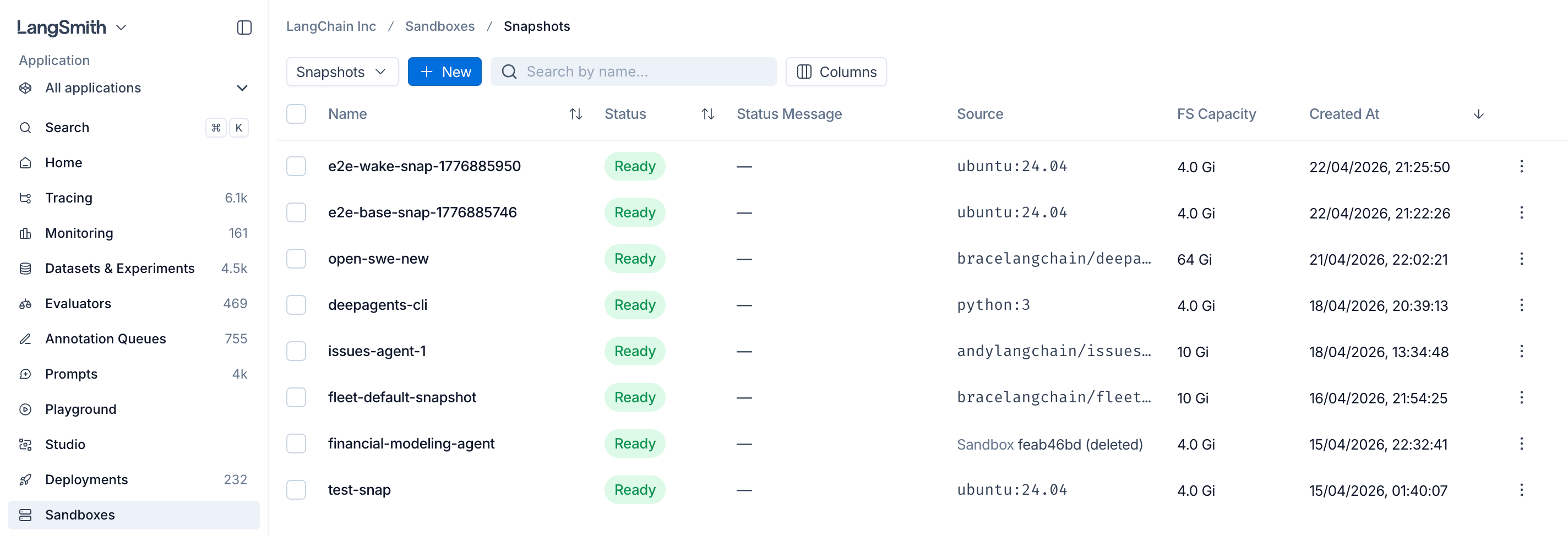
By default, capture preserves the **filesystem only**. Installed packages (under `/usr/local`, `/root`, `/opt`, the home directory, etc.) and files you wrote to those locations are kept, as is `/tmp`. Only `/dev/shm` is a tmpfs, so everything else lives on the sandbox's disk. Running processes, open sockets, and in-memory state are **not** carried over: boot the new sandbox and start the processes you need again, or [capture memory too](#resume-from-memory).
You can boot a sandbox from a snapshot by **name** instead of ID — handy when you know the human-readable label you captured with:
```python Python theme={null}
sb = client.create_sandbox(snapshot_name="ml-ready")
```
```ts TypeScript theme={null}
const sb = await client.createSandbox({ snapshotName: "ml-ready" });
```
Pass at most one of `snapshot_id` / `snapshot_name` (or `snapshotId` / `snapshotName` in TypeScript). Omit both to use the default runtime.
### Tune capture timing
`capture_snapshot` blocks until the new snapshot is ready. Raise the `timeout` kwarg (default 60s) if your filesystem is large or your storage backend is slow.
```python Python theme={null}
snapshot = sb.capture_snapshot("ml-ready-v2", timeout=600)
```
```ts TypeScript theme={null}
const snapshot = await sb.captureSnapshot("ml-ready-v2", { timeout: 600 });
```
### Resume from memory
A snapshot can carry the sandbox's RAM alongside its filesystem. Boot from one and the sandbox resumes where it left off, with its processes still running, instead of cold-booting. Use this for environments that are slow to warm up, such as a loaded model or a started database.
Memory snapshots are available over the REST API only. The `langsmith.sandbox` Python and TypeScript clients do not expose these fields yet.
Capture memory by setting `include_memory` on a capture:
```bash theme={null}
curl -X POST \
"$LANGSMITH_ENDPOINT/api/v2/sandboxes/boxes/my-vm/snapshot" \
-H "x-api-key: $LANGSMITH_API_KEY" \
-H "Content-Type: application/json" \
-d '{"name": "warm-model", "include_memory": true}'
```
The response reports `memory_snapshot_size_bytes` when memory was captured. `include_memory` requires a sandbox that is running or stopped, and it cannot be combined with `checkpoint` or `docker_image`.
Some sandboxes run on an overlay filesystem runtime that cannot carry a memory image. Capturing one returns `include_memory is not supported for overlay-rootfs sandboxes`. LangSmith assigns that runtime, so it is not something you select per sandbox.
Two fields on create control the other half:
| Field | What it does |
| ------------------------- | ------------------------------------------------------------------------------------------------------------------------------------------------------------------------------------------------------------------------------------------------------------------------------------------------- |
| `restore_memory` | Omit it to resume from memory when the snapshot has it and cold-boot when it does not. `true` requires memory and fails the request if the snapshot has none. `false` always cold-boots. |
| `preserve_memory_on_stop` | `true` suspends RAM on a voluntary stop (idle timeout or explicit stop) so the sandbox resumes where it left off when it next wakes, rather than cold-booting. Defaults to `false`, which keeps only the filesystem. Restarts triggered by infrastructure maintenance preserve memory either way. |
```bash theme={null}
curl -X POST "$LANGSMITH_ENDPOINT/api/v2/sandboxes/boxes" \
-H "x-api-key: $LANGSMITH_API_KEY" \
-H "Content-Type: application/json" \
-d '{
"name": "warm-vm",
"snapshot": "warm-model",
"restore_memory": true,
"preserve_memory_on_stop": true
}'
```
Capturing memory from a **stopped** sandbox only works when that sandbox was created with `preserve_memory_on_stop`. Without it, the stop discards RAM and there is nothing to capture.
## List, fetch, and delete snapshots
```python Python theme={null}
# List all snapshots in the workspace
snapshots = client.list_snapshots()
for s in snapshots:
print(s.id, s.name, s.status)
# Fetch a single snapshot by ID
snapshot = client.get_snapshot("550e8400-e29b-41d4-a716-446655440000")
# Delete a snapshot (fails if any sandbox still references it)
client.delete_snapshot(snapshot.id)
```
```ts TypeScript theme={null}
const snapshots = await client.listSnapshots();
for (const s of snapshots) {
console.log(s.id, s.name, s.status);
}
const snapshot = await client.getSnapshot("550e8400-e29b-41d4-a716-446655440000");
await client.deleteSnapshot(snapshot.id);
```
`list_snapshots` / `listSnapshots` paginates server-side (default page size 50, max 500) and accepts optional filters: `name_contains` / `nameContains` (case-insensitive substring on name), `limit` (1–500), and `offset` (≥ 0). Page through results by advancing `offset`.
```python Python theme={null}
page = client.list_snapshots(name_contains="ml", limit=100)
```
```ts TypeScript theme={null}
const page = await client.listSnapshots({ nameContains: "ml", limit: 100 });
```
## Stopped sandboxes
A stopped sandbox keeps its filesystem, and the next request wakes it automatically. You do not need to start it yourself: send the command you wanted to run and the sandbox comes back up to serve it.
```python Python theme={null}
sb = client.create_sandbox(snapshot_id=snapshot.id, name="my-vm")
sb.run("echo 'hello' > /tmp/state.txt")
# Stop early to release resources. The idle timeout does this for you.
sb.stop()
# No start call: this wakes the sandbox and runs once it is up.
result = sb.run("cat /tmp/state.txt")
assert result.stdout.strip() == "hello"
```
```ts TypeScript theme={null}
const sb = await client.createSandbox(snapshot.id, { name: "my-vm" });
await sb.run("echo 'hello' > /tmp/state.txt");
await sb.stop();
const result = await sb.run("cat /tmp/state.txt");
console.log(result.stdout.trim()); // "hello"
```
The first request after a stop pays the boot cost, so it is slower than the ones that follow. Create the sandbox with `preserve_memory_on_stop` to [resume from memory](#resume-from-memory) instead of cold-booting.
## Next steps
* [Create sandboxes from snapshots with the SDK](/langsmith/sandbox-sdk)
* [Expose HTTP services with Service URLs](/langsmith/sandbox-service-urls)
* [Inject credentials via the Auth proxy](/langsmith/sandbox-auth-proxy)
***
[Connect these docs](/use-these-docs) to Claude, VSCode, and more via MCP for real-time answers.
[Edit this page on GitHub](https://github.com/langchain-ai/docs/edit/main/src/langsmith/sandbox-snapshots.mdx) or [file an issue](https://github.com/langchain-ai/docs/issues/new/choose).
 ## Understand the default snapshot
When you create a sandbox without selecting a snapshot, LangSmith uses a built-in default snapshot. The default provides an Ubuntu 24.04 filesystem with common development tools. LangSmith may update the packages and tools included in the default snapshot over time.
### Inspect the default snapshot filesystem in self-hosted deployments
In a self-hosted deployment, LangSmith creates the default snapshot from a filesystem embedded in the sandbox runtime container image, `sandbox-host`:
1. During the `sandbox-host` image build, LangSmith starts with Ubuntu 24.04 and installs the default development tools.
2. LangSmith packages that filesystem as a compressed 16 GiB ext4 file at `/opt/sandbox-host/bin/builder-base.ext4.gz`.
3. When `sandbox-host` starts, LangSmith uses the embedded filesystem to create the default snapshot.
The compressed ext4 file, rather than a separately pulled container image, is the source of the default snapshot filesystem.
Scanning the `sandbox-host` container image alone does not inspect the files inside this compressed artifact. To verify the default snapshot, extract and scan the embedded filesystem separately.
## Understand the default snapshot
When you create a sandbox without selecting a snapshot, LangSmith uses a built-in default snapshot. The default provides an Ubuntu 24.04 filesystem with common development tools. LangSmith may update the packages and tools included in the default snapshot over time.
### Inspect the default snapshot filesystem in self-hosted deployments
In a self-hosted deployment, LangSmith creates the default snapshot from a filesystem embedded in the sandbox runtime container image, `sandbox-host`:
1. During the `sandbox-host` image build, LangSmith starts with Ubuntu 24.04 and installs the default development tools.
2. LangSmith packages that filesystem as a compressed 16 GiB ext4 file at `/opt/sandbox-host/bin/builder-base.ext4.gz`.
3. When `sandbox-host` starts, LangSmith uses the embedded filesystem to create the default snapshot.
The compressed ext4 file, rather than a separately pulled container image, is the source of the default snapshot filesystem.
Scanning the `sandbox-host` container image alone does not inspect the files inside this compressed artifact. To verify the default snapshot, extract and scan the embedded filesystem separately.